Math Workshop
A math canvas on my class website for fractions, place value, geometry, and number lines, with shareable, editable scenes.
What it is
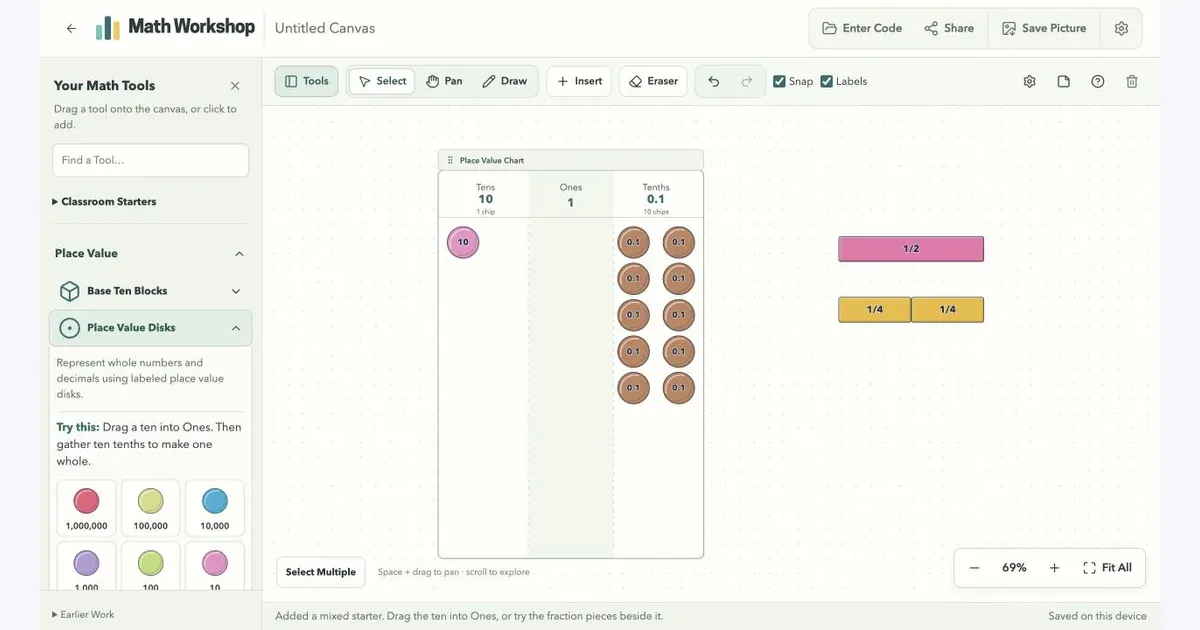
Math Workshop is a workspace built into my class website. Fractions, place value disks, base ten blocks, number lines, geometry tools, and more live together on one canvas. Move pieces around, add an explanation, and save or share the result.
It is designed for a larger screen, where there is room to build and compare ideas. The tool library sits beside the workspace, and classroom starters offer a way in without beginning with an empty board.
What you can build
Put fraction bars beside a place value chart. Trade a ten for ones. Draw signed jumps on a number line, or move a geometry point and watch its dependent construction follow.
The workspace also supports text, drawing, images, grids, grouping, and locked objects. Connected tools can pass numbers or data between a slider, function machine, table, or chart.
What mattered
The math underneath the pieces needs to stay consistent. Place value exchanges preserve the total, number lines use exact rational values, and undo gives students or teachers a way back after a change.
Sharing keeps the work editable. A code or link opens a copy of a saved canvas, so someone else can pick up the idea and keep building. A JPG export captures the full scene when a picture is enough.
Where it stands
Math Workshop is live under Tools/Games on my class website. It saves work in the current browser and supports permanent share codes for snapshots. The library continues to grow around the kinds of models and explanations useful in elementary math.